

Bot and Agent Traffic
Bots browse your collections, never buy, and quietly drag your numbers down. Dynasort now recognizes them and leaves them out of your Insights by default, and it never lets them influence your sort order.
Overview
Section titled “Overview”A growing share of storefront traffic is automated: crawlers, scrapers, price monitors and page-rendering services that load your pages in a real browser. They add sessions and product views but never add to cart, so in any analytics tool they make conversion and add-to-cart rates look worse than your shoppers really are. One collection can look like it suddenly stopped converting when the only thing that changed was a bot discovering it.
This is not a single-store problem. The same bots visit every store Dynasort runs on, and they are hitting Shopify stores and the web as a whole. In October 2026 one rendering farm alone produced more than 180,000 sessions across 85 of the stores we serve in a single week, and not one of them added a product to cart.
Three kinds of traffic
Section titled “Three kinds of traffic”Dynasort sorts every storefront session into one of three groups.
| Traffic | What it is | Counted in Insights (default) | Used for sorting |
|---|---|---|---|
| People | A shopper in a browser. Visitors who arrive from ChatGPT, Perplexity or other assistants by clicking a link are people. | Yes | Yes |
| Shopping agents | Assistants that browse and buy on behalf of a real person, such as ChatGPT’s agent. | Yes, as part of Shoppers | Yes |
| Bots | Crawlers, scrapers, monitors and page-rendering services. | No | Never |
How Dynasort tells them apart
Section titled “How Dynasort tells them apart”The short version: agents shop, bots don’t. An agent exists to find or buy something for a person, so over time its traffic produces carts and checkouts. A bot never does. Because Dynasort sees every store it runs on, it can judge a device by how it behaves across the whole network, not just on your store.
Each session is checked against these signals, strongest first:
- Declared identity. Visitors that name themselves in their user agent are classified directly. Crawlers such as Googlebot, Bingbot and Sogou, headless browsers and monitoring tools are bots. Assistants that fetch pages for a person (ChatGPT-User, Claude-User, Perplexity-User and similar) are shopping agents.
- Signed agents. Some agents sign their requests with Web Bot Auth. Signatures from known shopping-agent operators, such as ChatGPT, count as agents. A signature alone does not, because rentable headless-browser services sign their requests too.
- Meta’s own network. Traffic from Meta’s servers is ad review and link checking, including automated add-to-carts, so it is always a bot.
- Shopping. A session that adds to cart or reaches checkout is never a bot. It is a person, or a shopping agent when it comes from a hosting network.
- Impossible browsers. A real browser window can’t be bigger than its screen. Dynasort allows for rotated tablets and for the 8 pixels a maximized Windows window overhangs, and on phones only checks width, because Android reports window height in device pixels. Square desktop screens of 800 pixels or more, such as 1280x1280 or 1600x1600, are headless-browser defaults that no real monitor uses.
- Fleet fingerprints. Twice a day Dynasort groups the last 7 days of sessions by device fingerprint (browser, screen size, window size and language) across every store. A fingerprint with at least 200 sessions and zero carts, where the stores it visited would normally have produced 10 or more carts from that many shoppers, is marked as a bot. Its earlier sessions are reclassified automatically.
- Busy addresses. One IP address with 100 or more sessions in a day and no cart or checkout is a bot when it sits on a hosting network or its sessions average under 3 seconds. Mobile carriers that share one address across many phones are left alone because their sessions look like real browsing.
- Hosting networks. A session from a cloud or hosting provider that views no products and leaves within a couple of pages or a few seconds is a bot. Home and mobile internet providers never trigger this rule.
Everything else counts as a person.
Your setting: Traffic in Insights
Section titled “Your setting: Traffic in Insights”Go to Settings > Traffic in Insights to choose which sessions your Insights count.
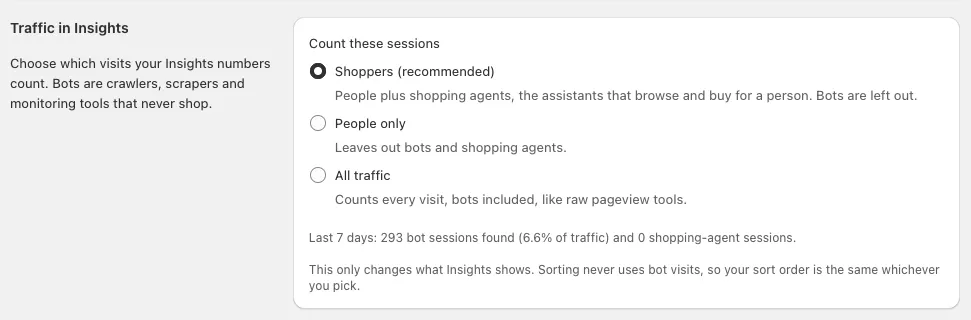
- Shoppers (recommended). People plus shopping agents. Bots are left out. This is the default.
- People only. Leaves out bots and shopping agents.
- All traffic. Counts every visit, bots included, like raw pageview tools.
The section also shows how many bot and shopping-agent sessions Dynasort found on your store in the last 7 days.
When you change the setting, Dynasort rebuilds your Insights with the new choice. This usually takes a few minutes; until it finishes you’ll see the default numbers.
What you’ll see in Insights
Section titled “What you’ll see in Insights”At the top of Insights, the Traffic quality card tells you which sessions the numbers count and how many bot sessions were left out for the selected timeframe, with a link to change the setting.

When a collection’s traffic jumps without carts following, the card also shows a warning. Dynasort flags a collection when its sessions at least tripled week over week, with 300 or more sessions this week, its add-to-cart rate fell by two thirds or more, and at least 60% of its visitors arrived with no referrer and no campaign (UTM) tag. Campaigns don’t trigger it: an email blast or a paid social push brings a wave of browsers too, but they arrive tagged. Untagged surges are how bot traffic Dynasort hasn’t identified yet usually looks. If you see the warning, let us know and we’ll check.
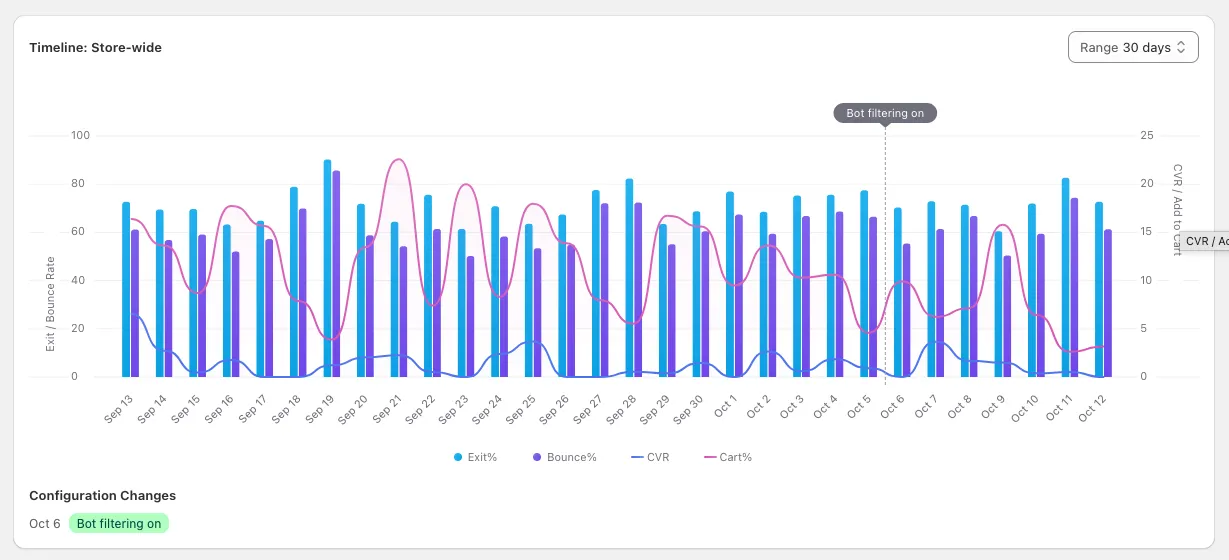
The performance timeline shows a Bot filtering on marker on the day filtering started, and a marker whenever you change the Traffic in Insights setting.
History
Section titled “History”Days from October 6, 2026 onward are filtered. Earlier days stay exactly as they were recorded. Expect a step up in conversion and add-to-cart rates on that date in your timeline: that is the bots leaving, not a change in your shoppers.
Privacy
Section titled “Privacy”To recognize hosting networks and busy addresses, Dynasort looks at the network a visit comes from. We never store a shopper’s IP address. For each session we keep only:
- the country
- the network owner, such as a mobile carrier or a cloud provider
- the IP address with its last part removed (for example 203.0.113.x)
- a scrambled version of the full address that is created with a new random key every day and cannot be traced back
The daily keys are deleted after two days, so the scrambled values can’t be linked across days.
Country and network data come from DB-IP (IP Geolocation by DB-IP, licensed under CC BY 4.0).
- Compare Insights with GA4 on the same collection: a large gap in sessions with a similar number of carts is usually bot traffic Dynasort removed.
- If a collection is flagged for a spike and you didn’t run a campaign, it’s worth a look. Tell us and we’ll check whether it’s a new bot.
- Use A/B Testing results with confidence: they’re measured on shoppers, so bots can’t tip a test.
Frequently asked questions
Why does Dynasort leave bots out of Insights?
Bots browse collections and never buy. Counting them pads your session numbers and pulls conversion and add-to-cart rates down, so a collection can look like it is failing when your shoppers are buying normally. Leaving them out shows what real shoppers did.
Is bot traffic a problem for my store only?
No. The same bots visit every store Dynasort runs on, and they are hitting Shopify stores and the web as a whole. In October 2026 bots were roughly 15% of all sessions across our network, and above 30% on some stores.
Do bots affect my sort order?
No. Sorting never uses bot visits, whatever you choose for Traffic in Insights. Product views, add-to-carts and conversion rates in your recipes come from shoppers only.
Does ChatGPT's shopping agent count as a shopper?
Yes. A shopping agent browses and buys on behalf of a real person, so Dynasort counts it with your shoppers by default. Choose People only in Settings if you want to see human visitors alone.
Why does Google Analytics still show more sessions than Dynasort?
GA4 filters only bots that declare themselves. Most of the traffic Dynasort removes uses an ordinary browser user agent, so GA4 counts it as a person. GA4 also counts landing-page sessions while Dynasort counts sessions that viewed each collection, so totals always differ.
What if a real shopper is counted as a bot?
Any session that adds to cart or checks out is never counted as a bot, so buyers are always counted. The remaining risk is a person on a hosting network or VPN who looks at very little; tell us if something looks off and we review the rule.
Can I see the numbers with bots included?
Yes. In Settings, set Traffic in Insights to All traffic. Your Insights rebuild within a few minutes. Switch back any time.
Does Dynasort store shopper IP addresses?
No. We keep the country, the network owner, the IP address with its last part removed and a scrambled version of the address that changes every day. The full IP address is never stored.
Which days are filtered?
Every day from October 6, 2026 onward. Earlier days stay as they were recorded, and your Insights timeline shows a Bot filtering on marker on that date.