

Back In Stock
The Back In Stock attribute rewards products that recently came back in stock. Shoppers who saw an item sell out are often waiting for it to return, and restocked items convert well while that demand is fresh. This attribute lets you surface them automatically, either by boosting them inside a sorted collection or by collecting them into a dedicated “Back In Stock” managed collection.
Available for: Collection Sorting (Recipes) and Managed Collections.
How it works
Section titled “How it works”Dynasort continuously tracks your inventory levels and records a restock event whenever an item crosses from out of stock back to in stock. A product earns this attribute’s points when it has a qualifying restock event inside your chosen timeframe.
Two settings control what counts as a qualifying restock: the detection mode and the minimum restock quantity.
Detection mode
Section titled “Detection mode”- Entire product back in stock: the product’s total inventory across all variants was at zero (the product was fully unbuyable), and now has stock again. This is the default, and matches what most shoppers mean by “it’s back.”
- Any variant back in stock: any single variant crossed from zero to positive, even if other variants still had stock. Use this when individual variants matter more than the product as a whole, for example when a popular size returning is itself worth promoting. Expect this mode to fire more often, since stores that cycle sizes in and out of stock will produce frequent variant-level events.
Minimum restock quantity
Section titled “Minimum restock quantity”Restocks smaller than this quantity are ignored. This is the filter that keeps returns and exchanges from triggering the attribute: a customer return typically puts one or two units back into inventory, while a real restock adds many. The default of 3 works for most stores; if your typical restock is large, raising it makes the signal even cleaner.
Configuration
Section titled “Configuration”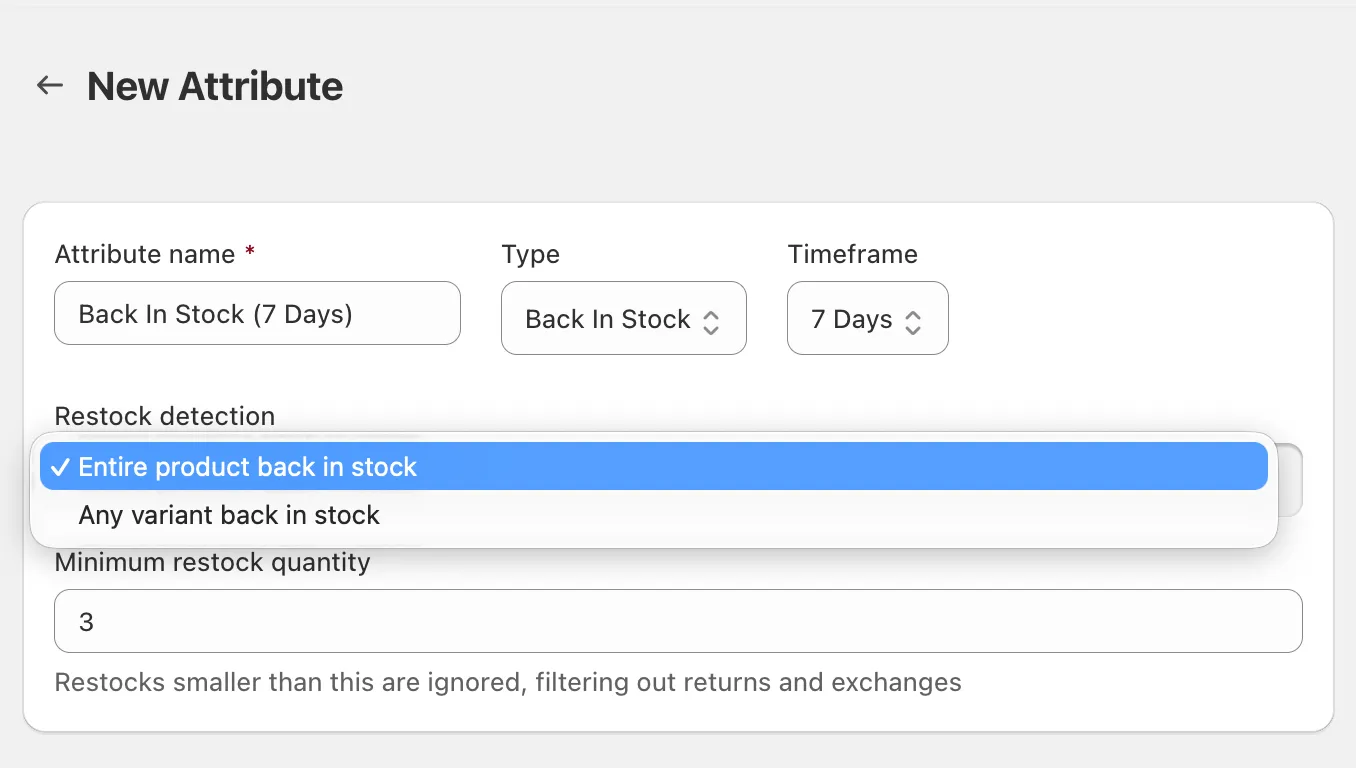
| Setting | What it does | Default |
|---|---|---|
| Timeframe | How recently the restock must have happened (24 hours to 90 days) | 30 days |
| Mode | Entire product vs. any variant (see above) | Entire product |
| Minimum restock quantity | Restocks below this quantity are ignored | 3 |
In a recipe, the attribute is all-or-nothing: a product with a qualifying restock inside the timeframe earns the attribute’s full point weight, and every other product earns zero. There is no sliding scale, so the points act as a flat boost layered on top of your other attributes.
Using it in a Managed Collection
Section titled “Using it in a Managed Collection”As a managed collection condition, Back In Stock reads as:
Back In Stock [operator] [quantity] in the last [timeframe]
For example, “Back In Stock greater than 5 in the last 7 days” selects products that came back in stock within the past week with more than 5 units. Only products that actually had a restock event in the window are candidates; the quantity comparison applies to the largest restock the product had during that time.
This makes a self-maintaining “Back In Stock” collection a one-condition setup: products join when they restock and drop out automatically once the event ages past your timeframe.
Methodology and notes
Section titled “Methodology and notes”- Out of stock means total inventory at or below zero. Negative inventory (from “continue selling when out of stock”) counts as out of stock.
- Variants that do not track inventory are ignored entirely, so untracked items can never trigger a restock event.
- Inventory is checked on your plan’s regular processing schedule, so a restock is typically detected within minutes to about an hour of happening in Shopify. On lower-tier plans with longer processing intervals, detection can occasionally take slightly longer.
- Restock history begins when the feature launched (June 2026). Longer timeframes like 60 or 90 days only become fully meaningful once that much history has accumulated.
- A product that restocks and then sells out again still scores until the restock event ages out of your timeframe. If you want sold-out products pushed down regardless, your recipe’s sold-out handling takes care of that as usual.
- Pair Back In Stock with behavioral attributes like Product Views or Added To Cart: a restocked product that shoppers were already engaging with is the strongest candidate for a top spot.
- Short timeframes (3 to 7 days) keep the boost focused on genuinely fresh restocks; long timeframes turn it into a gentler, broader signal.
- You can add multiple instances of this attribute to one recipe, for example a high-weight 3-day instance plus a low-weight 30-day instance, so the boost decays in steps as the restock ages.