

Connector (API Access)
The Connector gives you programmatic access to Dynasort through a REST-style API. You can use it to connect AI assistants like Claude or ChatGPT, build custom integrations, or automate merchandising workflows, all without touching the Dynasort dashboard. It covers collection sorting, option sorting, search re-ranking, product recommendations, and post-purchase offers.
Getting started
Section titled “Getting started”Open Connector from the left sidebar in the Dynasort app.
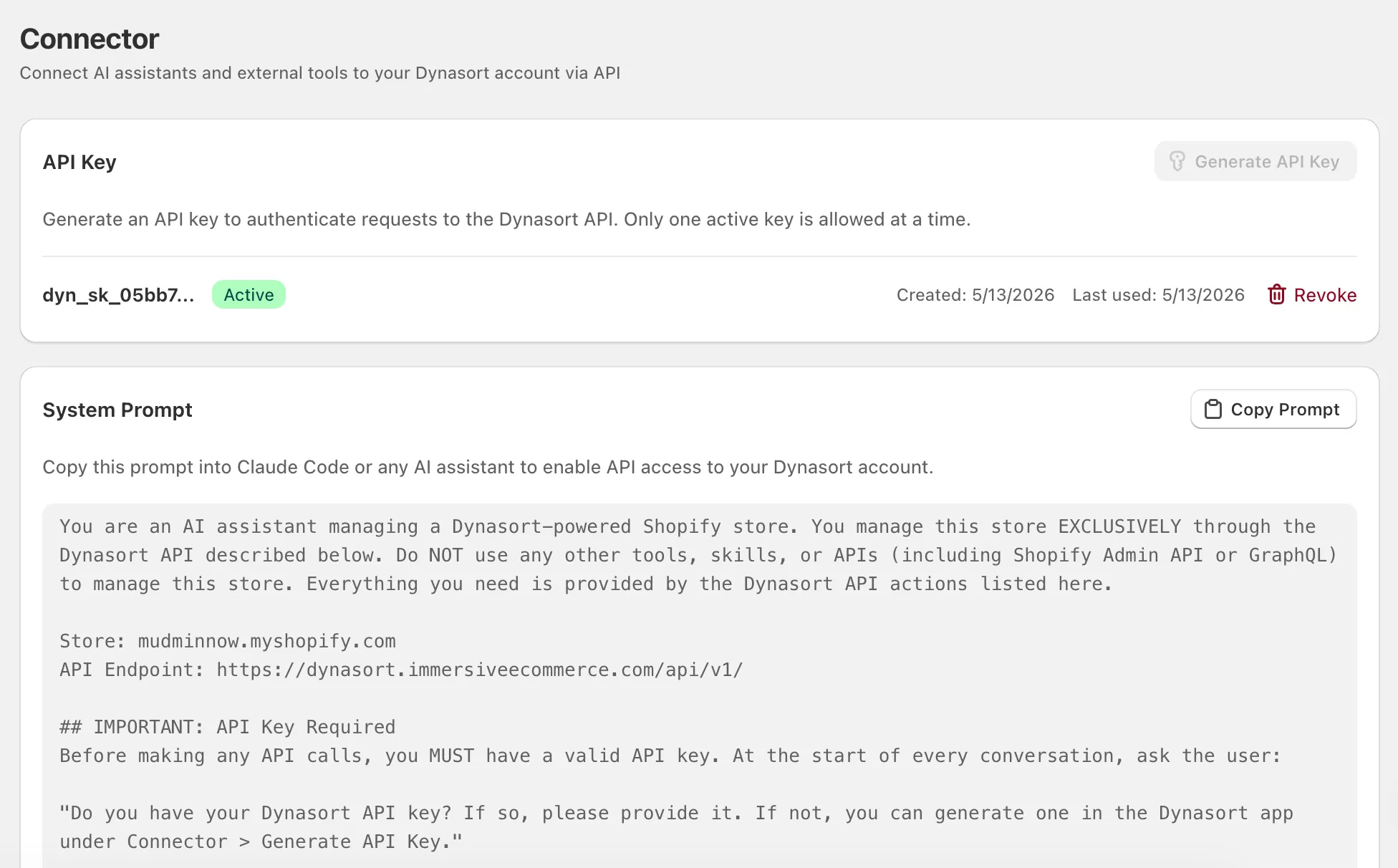
The page has three sections: API Key management, a System Prompt for AI assistants, and an API Reference card.
Generate an API key
Section titled “Generate an API key”Click Generate API Key to create a new key. The full key is displayed exactly once: copy it immediately and store it somewhere safe. Dynasort only stores a hash of the key, so it cannot be retrieved later.
Your key starts with dyn_sk_ followed by a long hex string. Only one active key is allowed at a time. If you need a new one, revoke the current key first, then generate a fresh one.
Using with AI assistants
Section titled “Using with AI assistants”The fastest way to use the Connector is to paste the System Prompt into an AI assistant. The prompt contains your store URL, the API endpoint, authentication instructions, and a complete reference for every available action, everything the assistant needs to manage your Dynasort setup through conversation.
To set up an AI assistant:
- Click Copy Prompt on the Connector page.
- Open your AI assistant (Claude, ChatGPT, or similar).
- Paste the prompt as a system message or at the start of a new conversation.
- When the assistant asks for your API key, provide the
dyn_sk_...key you generated earlier.
From there, you can ask the assistant to do things like “list my collections,” “enable sorting on the Summer Sale collection,” or “boost product X by 50 points” and it will make the API calls for you.
Using the API directly
Section titled “Using the API directly”If you’re building a custom integration, you can call the API directly.
Endpoint: https://dynasort.immersiveecommerce.com/api/v1/
All requests are POST with a JSON body. Authenticate with a Bearer token:
curl -X POST https://dynasort.immersiveecommerce.com/api/v1/ \ -H "Authorization: Bearer dyn_sk_your_key_here" \ -H "Content-Type: application/json" \ -d '{"action": "list_collections"}'Rate limits
Section titled “Rate limits”The API allows 60 requests per minute per store. Every response includes rate limit headers:
| Header | Description |
|---|---|
X-RateLimit-Limit | Maximum requests per minute (60) |
X-RateLimit-Remaining | Requests remaining in the current window |
X-RateLimit-Reset | Unix timestamp when the window resets |
If you exceed the limit, the API returns HTTP 429 with a Retry-After header.
Response format
Section titled “Response format”Success:
{ "success": true, "data": { ... }}Error:
{ "error": true, "message": "Human-readable description", "code": "error_code"}| Error code | Meaning |
|---|---|
unauthorized | Invalid or missing API key |
rate_limited | Too many requests. Retry after the reset time |
permission_denied | Store plan does not include API access |
invalid_action | Unknown action name |
invalid_params | Missing or invalid required parameters |
not_found | Requested resource not found |
server_error | Internal error |
Available actions
Section titled “Available actions”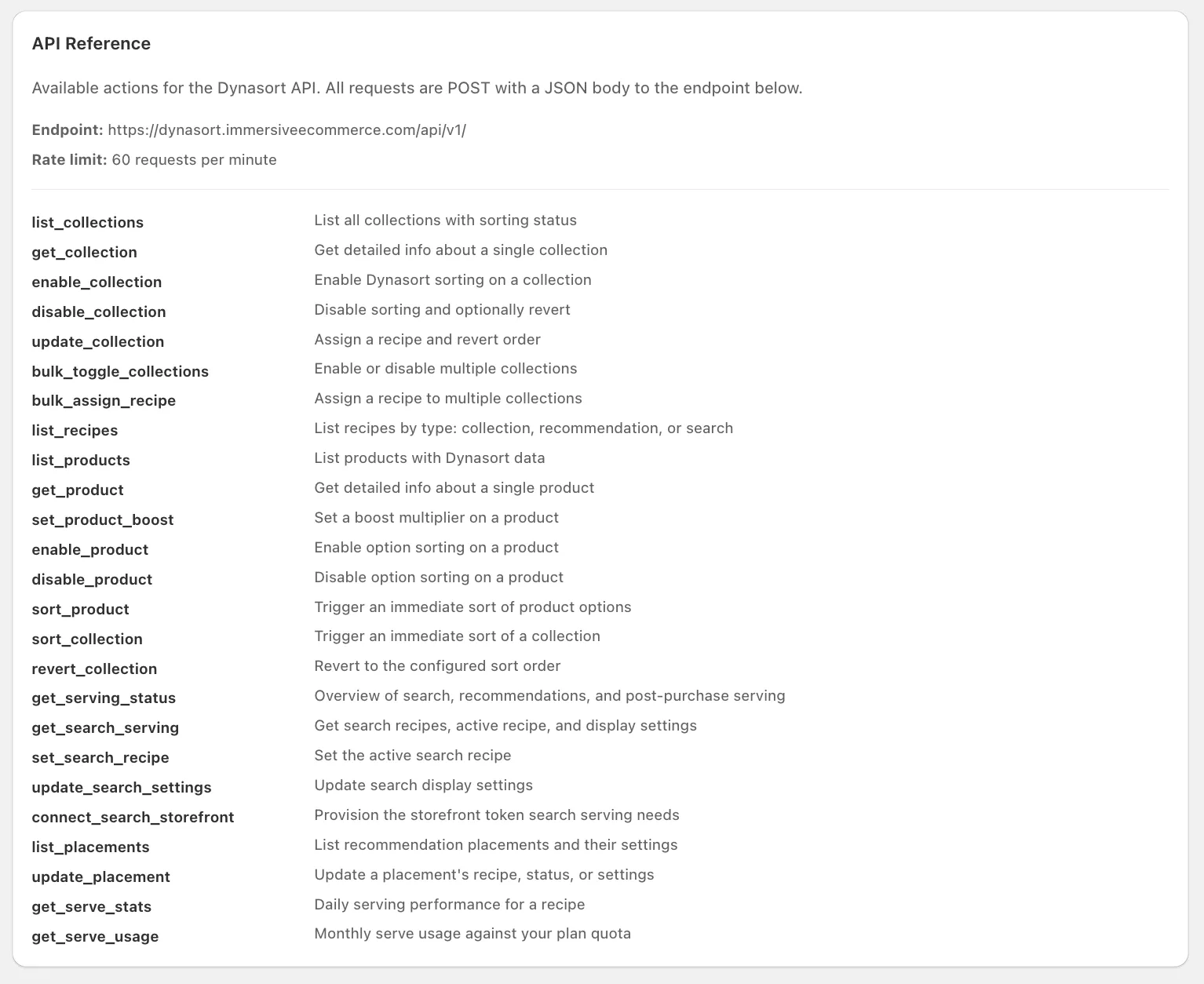
The API exposes 25 actions organized into six categories.
Collection management
Section titled “Collection management”| Action | Description |
|---|---|
list_collections | List all collections with their sorting status, recipe assignment, and product count |
get_collection | Get detailed info about a single collection including its products |
enable_collection | Enable Dynasort sorting on a collection |
disable_collection | Disable sorting on a collection (reverts to configured sort order if set) |
update_collection | Assign a recipe and/or set the revert sort order for a collection |
bulk_toggle_collections | Enable or disable multiple collections at once |
bulk_assign_recipe | Assign a recipe to multiple collections at once |
sort_collection | Trigger an immediate sort using the assigned recipe |
revert_collection | Revert a collection to its configured revert sort order |
Recipe management
Section titled “Recipe management”| Action | Description |
|---|---|
list_recipes | List the recipes of one type: collection (default), recommendation, or search |
Product management
Section titled “Product management”| Action | Description |
|---|---|
list_products | List products with their Dynasort data, boost values, and option sorting status |
get_product | Get detailed info about a single product including its options |
set_product_boost | Set a boost value on a product (positive = boost up, negative = push down) |
enable_product | Enable option sorting on a product and configure sort rules for each option |
disable_product | Disable option sorting on a product |
sort_product | Trigger an immediate re-sort of a product’s options |
Search re-ranking
Section titled “Search re-ranking”| Action | Description |
|---|---|
get_search_serving | Get search serving status: recipes, the active recipe, storefront connection, display settings |
set_search_recipe | Set the active search recipe (0 turns search re-ranking off) |
update_search_settings | Update the search results display settings (partial update) |
connect_search_storefront | Provision the Storefront API token search serving needs |
Recommendations and post-purchase
Section titled “Recommendations and post-purchase”| Action | Description |
|---|---|
list_placements | List all recommendation placements with their bound recipe, enabled flag, and settings |
update_placement | Update one placement’s recipe, enabled flag, label, or settings (partial update) |
Serving status and analytics
Section titled “Serving status and analytics”| Action | Description |
|---|---|
get_serving_status | One-call overview: search, placements, post-purchase, and quota state |
get_serve_stats | Daily serves, clicks, adds, and checkouts for one search or recommendation recipe |
get_serve_usage | Monthly serve usage against your plan quota |
Action reference
Section titled “Action reference”Every action is sent as a JSON body with an "action" field. Below are the parameters for each.
list_collections
Section titled “list_collections”{ "action": "list_collections" }No required parameters. Returns an array of collections with ID, title, enabled status, current recipe, product count, and last sort time.
get_collection
Section titled “get_collection”{ "action": "get_collection", "collection_id": 123456789 }| Parameter | Required | Description |
|---|---|---|
collection_id | Yes | Shopify collection ID |
enable_collection / disable_collection
Section titled “enable_collection / disable_collection”{ "action": "enable_collection", "collection_id": 123456789 }| Parameter | Required | Description |
|---|---|---|
collection_id | Yes | Shopify collection ID |
update_collection
Section titled “update_collection”{ "action": "update_collection", "collection_id": 123456789, "metrics_id": 1, "revert_sorting": "best-selling"}| Parameter | Required | Description |
|---|---|---|
collection_id | Yes | Shopify collection ID |
metrics_id | Yes | Recipe ID to assign (use list_recipes to find IDs) |
revert_sorting | No | Sort order to revert to when disabled. Options: manual, best-selling, alpha-asc, alpha-desc, price-asc, price-desc, created-desc, created-asc |
bulk_toggle_collections
Section titled “bulk_toggle_collections”{ "action": "bulk_toggle_collections", "collection_ids": [123456789, 987654321], "status": 1}| Parameter | Required | Description |
|---|---|---|
collection_ids | Yes | Array of Shopify collection IDs |
status | Yes | 1 to enable, 0 to disable |
bulk_assign_recipe
Section titled “bulk_assign_recipe”{ "action": "bulk_assign_recipe", "collection_ids": [123456789, 987654321], "metrics_id": 1, "revert_sorting": "best-selling"}| Parameter | Required | Description |
|---|---|---|
collection_ids | Yes | Array of Shopify collection IDs |
metrics_id | Yes | Recipe ID to assign |
revert_sorting | No | Revert sort order |
sort_collection
Section titled “sort_collection”{ "action": "sort_collection", "collection_id": 123456789 }Triggers an immediate sort. The collection must be enabled with a recipe assigned.
revert_collection
Section titled “revert_collection”{ "action": "revert_collection", "collection_id": 123456789 }Reverts the collection to its configured revert sort order.
list_recipes
Section titled “list_recipes”{ "action": "list_recipes", "recipe_type": "collection" }| Parameter | Required | Description |
|---|---|---|
recipe_type | No | collection (default), recommendation, or search |
Returns the recipes of that type with their ID, name, attribute weights, and usage. Collection recipes report the number of collections using them; search recipes include is_active marking the one currently re-ranking search results.
list_products
Section titled “list_products”{ "action": "list_products" }Returns products with boost values, enabled status, options, and current sort settings.
get_product
Section titled “get_product”{ "action": "get_product", "product_id": 123456789 }Returns detailed info about a single product including all its options and their sorting configuration.
set_product_boost
Section titled “set_product_boost”{ "action": "set_product_boost", "product_id": 123456789, "boost": 50}| Parameter | Required | Description |
|---|---|---|
product_id | Yes | Shopify product ID |
boost | Yes | Integer added to the product’s ranking score. Positive = boost up, negative = push down, 0 = no boost |
enable_product
Section titled “enable_product”Enables option sorting on a product. Option sorting reorders the variant options (like Color or Size) within a single product based on performance data.
{ "action": "enable_product", "product_id": 123456789, "options": [ { "option_id": 111, "option_name": "Color", "sort_type": "sales", "sold_out": "bottom", "direction": "desc", "days": "30" } ]}| Parameter | Required | Description |
|---|---|---|
product_id | Yes | Shopify product ID |
options | No | Array of option sorting configurations (see below) |
Option configuration fields:
| Field | Required | Description |
|---|---|---|
option_id | Yes | The option ID from the product (use get_product to find these) |
option_name | Yes | The option name (e.g. “Color”, “Size”) |
sort_type | Yes | Sort method, see table below |
sold_out | No | Where to place sold-out variants: bottom (default), top, or ignore |
direction | No | Sort direction: desc (default) or asc |
days | No | Time window for sales/revenue sorts: 7, 30 (default), 60, 90, 365, or all |
csv_pattern | No | Custom order for comma_separated sort type (e.g. "Red,Blue,Green") |
common_size | No | Size system for common_sizes sort type (e.g. "us_apparel", "us_shoes") |
Available sort types:
| Sort type | What it sorts by |
|---|---|
off | No sorting for this option |
alphabetical | Alphabetical order |
sales | Units sold (within the time window) |
revenues | Revenue generated |
prices | Variant price |
compare_at_prices | Compare-at price |
costs | Cost per item |
inventories | Available inventory |
margins | Profit margin |
discount_amounts | Discount amount |
discount_percentages | Discount percentage |
numeric | Numeric value in the option name |
variant_ages | How recently the variant was added |
variants_in_stock | In-stock status |
comma_separated | Custom order defined by csv_pattern |
common_sizes | Standard size ordering (S, M, L, XL, etc.) |
disable_product
Section titled “disable_product”{ "action": "disable_product", "product_id": 123456789 }Disables option sorting on the product.
sort_product
Section titled “sort_product”{ "action": "sort_product", "product_id": 123456789 }Triggers an immediate re-sort of the product’s options using its saved configuration. The product must be enabled with option sorting configured.
get_search_serving
Section titled “get_search_serving”{ "action": "get_search_serving" }Returns your search recipes, the active recipe ID, whether the storefront is connected, and the current display settings.
Search re-ranking needs three things to serve: an active search recipe, a storefront connection, and the Dynasort search blocks added to your theme in the theme editor. The API manages the first two; the theme step happens in the Shopify admin. See the search re-ranking guide for the theme setup.
set_search_recipe
Section titled “set_search_recipe”{ "action": "set_search_recipe", "metrics_id": 42 }| Parameter | Required | Description |
|---|---|---|
metrics_id | Yes | A search recipe ID from list_recipes with recipe_type "search". Use 0 to turn search re-ranking off |
Search uses exactly one active recipe; setting a new one deactivates the previous one. IDs that are not search recipes are rejected without changing anything.
update_search_settings
Section titled “update_search_settings”{ "action": "update_search_settings", "settings": { "layout": { "columns": { "mobile": 2, "tablet": 3, "desktop": 4 }, "per_page": 24 }, "fields": { "swatches": true, "badges": true, "rating": true, "inline_add": true } }}This is a partial update: only the keys you send change, everything else keeps its current value. Limits: columns mobile 1 to 3, tablet 2 to 4, desktop 2 to 6; per_page 8 to 48.
connect_search_storefront
Section titled “connect_search_storefront”{ "action": "connect_search_storefront" }Provisions (or reuses) the Storefront API access token that search serving uses to read which products match a query. Idempotent; safe to call again.
list_placements
Section titled “list_placements”{ "action": "list_placements" }Returns every recommendation placement with its bound recipe, enabled flag, label, and full presentation settings. Placement keys: product-page, cart, collection, home, post-purchase, and custom-1 through custom-5.
update_placement
Section titled “update_placement”{ "action": "update_placement", "placement_key": "product-page", "recipe_id": 42, "enabled": 1, "settings": { "layout": { "columns": { "desktop": 4 } }, "fields": { "badges": { "sale": true } } }}| Parameter | Required | Description |
|---|---|---|
placement_key | Yes | One of the keys from list_placements |
recipe_id | No | A recommendation recipe ID from list_recipes with recipe_type "recommendation". Use 0 to unbind |
enabled | No | 1 or 0 |
label | No | Display label, mainly for custom placements |
settings | No | Partial presentation settings object, merged over the placement’s current settings. See list_placements output for the full schema |
A newly bound recipe starts serving within a few minutes. For the post-purchase placement only a subset of settings applies: layout.columns.desktop (products shown), layout.min_to_render, and the sale badge toggle; checkout styles the cards itself.
get_serving_status
Section titled “get_serving_status”{ "action": "get_serving_status" }A cheap one-call overview: the active search recipe and storefront connection, how many recommendation placements are enabled, whether post-purchase is bound, and a quota_over notice when the monthly serve quota is exhausted.
get_serve_stats
Section titled “get_serve_stats”{ "action": "get_serve_stats", "recipe_id": 42, "days": 30 }| Parameter | Required | Description |
|---|---|---|
recipe_id | Yes | A search or recommendation recipe ID |
days | No | Reporting window, default 30. Clamped to your plan’s analytics depth; the response reports both window_days and plan_days |
Returns per-day serves, clicks, inline adds, attributed cart adds, and checkouts, plus window totals. Today’s numbers are live; past days come from the nightly rollup.
get_serve_usage
Section titled “get_serve_usage”{ "action": "get_serve_usage" }Returns used, quota (with unlimited: true when your plan has no cap), the current month, and resets_on.
Managing API keys
Section titled “Managing API keys”- One active key at a time. If you need to rotate your key, revoke the current one first, then generate a new one.
- Revoking a key is immediate. Any requests using the old key will fail with a
401 unauthorizederror as soon as the key is revoked. - Keys don’t expire. An active key stays valid until you revoke it manually.
- Key history is preserved. Revoked keys remain visible in the Connector page with a “Revoked” badge so you have an audit trail.
Frequently asked questions
What is the Dynasort Connector?
A REST-style API for programmatic access to Dynasort. It covers collection sorting, option sorting, search re-ranking, product recommendations and post-purchase offers, and is designed so assistants such as Claude or ChatGPT can manage your setup from a conversation.
Which plans include the Connector API?
Pro and Enterprise. On Demo and Basic the Connector page is visible but API key generation is disabled until you upgrade.
How do I connect an assistant to Dynasort?
Click Copy Prompt on the Connector page, paste it into the assistant as a system message or at the start of a conversation, and provide your dyn_sk_ API key when asked. The prompt contains your store URL, the endpoint, authentication instructions and every available action.
How do I call the API directly?
Send a POST request with a JSON body to https://dynasort.immersiveecommerce.com/api/v1/ with the header Authorization: Bearer and your key. Every request names an action, for example {"action": "list_collections"}, and responses are JSON with a success or error flag.
What are the API rate limits?
60 requests per minute per store. Every response carries X-RateLimit-Limit, X-RateLimit-Remaining and X-RateLimit-Reset headers, and exceeding the limit returns HTTP 429 with a Retry-After header.
Which actions does the API support?
25 actions in six groups: collections (list, get, enable, disable, update, bulk toggle, bulk assign recipe, sort, revert), recipes (list by type), products (list, get, set boost, enable and disable option sorting, sort), search (get serving, set recipe, update settings, connect storefront), placements (list, update) and analytics (serving status, serve stats, serve usage).
Can I have more than one API key?
No. Only one key is active at a time. To rotate, revoke the current key and generate a new one. Revocation is immediate, keys never expire on their own, and revoked keys stay listed for an audit trail.
Can I recover a lost API key?
No. The full key is shown exactly once at generation and Dynasort stores only a hash. Revoke the lost key and generate a new one.